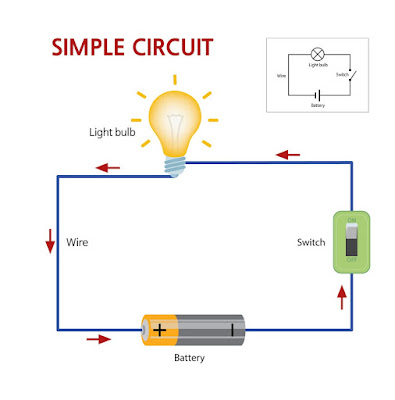
Simple Circuit

                                                                                               Circuit Diagram
 

An electrical network is an interconnection of electrical 
 components (e.g., batteries, resistors, inductors, capacitors, switches, transistors) or a model of such an interconnection, consisting of electrical elements (e.g., voltage sources, current sources, resistances, inductances, capacitances). An electrical circuit is a network consisting of a closed loop, giving a return path for the current. Linear electrical networks, a special type consisting only of sources (voltage or current), linear lumped elements (resistors, capacitors, inductors), and linear distributed elements (transmission lines), have the property that signals are linearly superimposable. They are thus more easily analyzed, using powerful frequency domain methods such as Laplace transforms, to determine DC response, AC response, and transient response.

resistive circuit is a circuit containing only resistors and ideal current and voltage sources. Analysis of resistive circuits is less complicated than analysis of circuits containing capacitors and inductors. If the sources are constant (DC) sources, the result is a DC circuit. The effective resistance and current distribution properties of arbitrary resistor networks can be modeled in terms of their graph measures and geometrical properties.[1]

A network that contains active electronic components is known as an electronic circuit. Such networks are generally nonlinear and require more complex design and analysis tools.


Comments

Popular posts from this blog

Solar Tracking System

Dual-Axis Solar Tracking System | Arduino SimpleCircuits Arduino Solar DIY Renewable Energy Project Dual-Axis Solar Tracking System Build a high-performance solar tracker that follows the sun in real-time. Four LDR sensors, an Arduino UNO, and two servo motors — boosting energy capture by up to 40% versus fixed mounts. 40% More Efficient 4 LDR Sensors 2 Servo Axes <300mA Power Draw Finished Build System Overview How the System Works The tracker reads the sky through four LDR sensors placed around the panel, computes intensity deltas, and drives two SG90 servos in a real-time closed loop — keeping the panel perpendicular to sunlight from sunrise to sunset. ...

Arduino Code Car Parking System

 // Created by Simple Circuits  #include <Wire.h>  #include <LiquidCrystal_I2C.h> LiquidCrystal_I2C lcd(0x27,16,2);    #include <Servo.h>  Servo myservo; int IR1 = 2; int IR2 = 3; int Slot = 4;           //Total number of parking Slots int flag1 = 0; int flag2 = 0; void setup() {   Serial.begin(9600);      lcd.init(); //initialize the lcd     lcd.backlight(); //open the backlight     pinMode(IR1, INPUT); pinMode(IR2, INPUT);    myservo.attach(4); myservo.write(100); lcd.setCursor (0,0); lcd.print("     ARDUINO    "); lcd.setCursor (0,1); lcd.print(" PARKING SYSTEM "); delay (2000); lcd.clear();   } void loop(){  if(digitalRead (IR1) == LOW && flag1==0){ if(Slot>0){flag1=1; if(flag2==0){myservo.write(0); Slot = Slot-1;} }else{ lcd.setCursor (0,0); lcd.print("    SORRY :(    ");   lc...

Arduino Code

 //define Pins #include <Servo.h> Servo servo; int trigPin = 11; int echoPin = 12; // defines variables long duration; int distance; void setup()  {   servo.attach(13);   servo.write(180);  delay(2000);    // Sets the trigPin as an Output pinMode(trigPin, OUTPUT); // Sets the echoPin as an Input  pinMode(echoPin, INPUT); } void loop()  { // Clears the trigPin digitalWrite(trigPin, LOW); delayMicroseconds(2); // Sets the trigPin on HIGH state for 10 micro seconds digitalWrite(trigPin, HIGH); delayMicroseconds(10); digitalWrite(trigPin, LOW); // Reads the echoPin, returns the sound wave travel time in microseconds duration = pulseIn(echoPin, HIGH); // Calculating the distance distance= duration*0.034/2; // Prints the distance on the Serial Monitor Serial.print("Distance: "); Serial.println(distance); if ( distance <= 25   ) // Change Distance according to Ultrasonic Sensor Placement  { servo.write(180); delay(3000); ...